Find & Review Sub Accounts
A Sub Account is a real fund account under a Primary Account, used to isolate funds by department, project, or business line.
Each Sub Account can be associated with multiple Budgets, which further control the spending limits of VCC cards.
Funds Model
Sub Account funds follow this relationship:
Sub Account Total Amount = Available Balance + Allocated Budget Limit + Frozen Amount
Where:
- Available Balance: Funds that have not yet been allocated and can be freely transferred
- Allocated Budget Limit: Total amount allocated to all Budgets under the Sub Account
- Frozen Amount: Funds temporarily unavailable at the account level
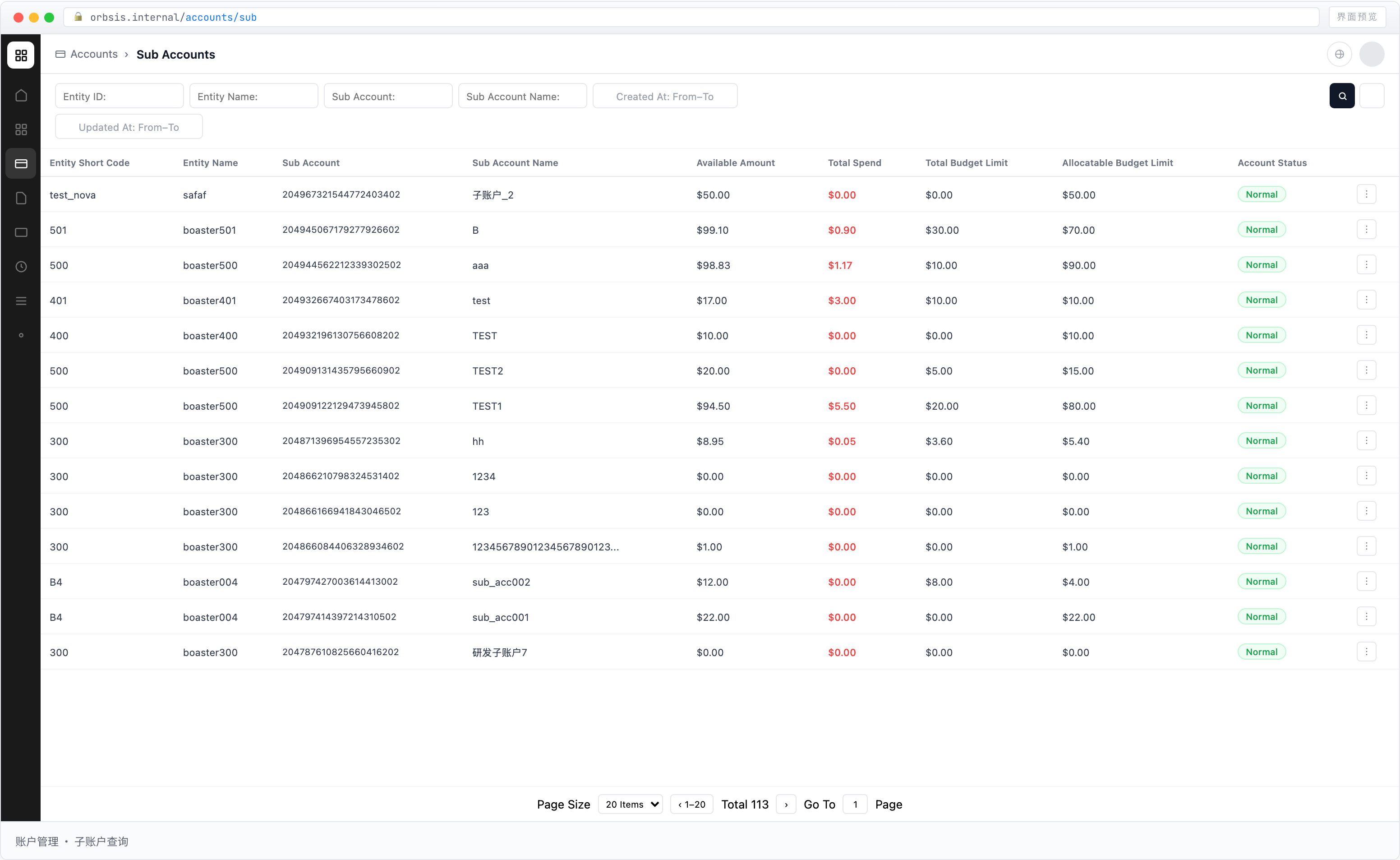
List Fields
| Field | Type | Description |
|---|---|---|
| Entity Short Name / Entity Name | TEXT | Entity that owns the Sub Account |
| Sub Account No. | CODE | Unique code of the Sub Account |
| Sub Account Name | TEXT | Business-readable name of the Sub Account |
| Available Balance | AMOUNT | Funds available for free allocation. Can be transferred back to the Primary Account, transferred to another Sub Account, or allocated to a Budget |
| Frozen Amount | AMOUNT | Funds frozen at the account level and temporarily unavailable |
| Allocated Budget Limit | AMOUNT | Sum of the Budget Limit of all Budgets under the Sub Account |
| Total Spent | AMOUNT | Aggregate transaction amount of cards associated with all Budgets under the Sub Account |
| Available to Spend | AMOUNT | Allocated Budget Limit − Total Spent |
| Account Status | ENUM | Current status of the Sub Account |
Field Definitions
Available Balance
Available Balance is the portion of Sub Account funds that has not been occupied by Budgets and can be freely allocated.
It can be used to:
- Transfer funds back to the Primary Account
- Transfer funds to another Sub Account
- Allocate funds to a Budget
After a Budget is funded, the corresponding amount moves from Available Balance to Allocated Budget Limit.
Frozen Amount
Frozen Amount represents funds frozen at the account level.
This field is not linked to card authorization transactions. Card authorizations and spending are handled at the Budget and Card layers.
Allocated Budget Limit
Allocated Budget Limit represents the total limit allocated by the Sub Account to all downstream Budgets.
That is:
Allocated Budget Limit = Sum of the Budget Limit of all Budgets under the Sub Account
When a Budget is disabled or its limit is released, the corresponding amount returns to the Sub Account's Available Balance.
Total Spent
Total Spent represents the aggregate transaction amount generated by cards associated with all Budgets under the Sub Account.
This is an aggregated display value. Detailed spending and transaction records should be reviewed at the Budget or Card transaction layer.
Available to Spend
Available to Spend represents how much of the allocated Budget limit has not yet been spent.
Formula:
Available to Spend = Allocated Budget Limit − Total Spent
Sub Account Available to Spend answers:
How much of the amount already allocated to Budgets remains unspent?
Budget-level Available Limit answers:
How much limit remains available for further allocation or use?
These fields have different meanings and should not be used interchangeably.
Detail Information
In addition to the funds fields above, Sub Account details also display account and Entity relationship information.
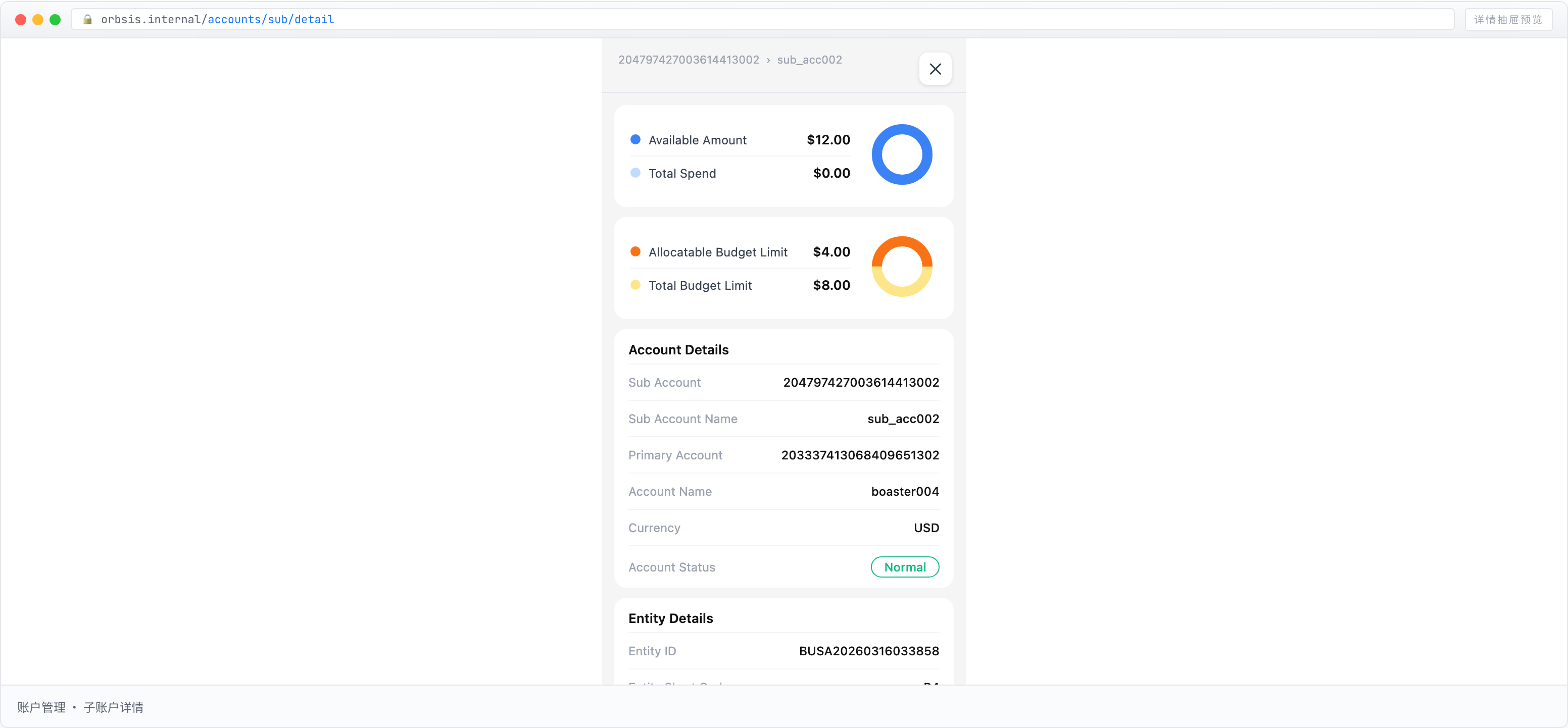
Account Information
| Field | Description |
|---|---|
| Sub Account No. | Unique Sub Account code generated automatically by the system |
| Sub Account Name | Display name of the Sub Account |
| Primary Account No. | Unique code of the Primary Account associated with the Sub Account |
| Account Name | Display name of the associated Primary Account |
| Currency | Settlement currency of the account, currently primarily USD |
| Account Status | Current status of the Sub Account |
Entity Information
| Field | Description |
|---|---|
| Entity ID | Unique identifier of the Entity that owns the Sub Account |
| Entity Short Name | Short identifier of the associated Entity |
| Entity Name | Full registered name of the associated Entity |
Dates
| Field | Description |
|---|---|
| Created At | Time when the Sub Account was created |
| Updated At | Time when the Sub Account information was last updated |