Find & Review Budgets
A Budget is a logical control layer built on top of a Sub Account and does not hold actual funds itself.
Each Sub Account can have multiple Budgets. Each Budget has its own limit and manages the VCC cards associated with it.
Entry
Left navigation:
Budget Management → Budget Query
Filters
| Field | Type | Description |
|---|---|---|
| Budget Name | TEXT | Business-defined identifier of the Budget |
| Entity ID / Entity Name | TEXT | Restricts the query to Budgets under a specified Entity |
| Sub Account Name / Sub Account No. | TEXT | Sub Account associated with the Budget |
| Created At | DATE | Time range when the Budget was created |
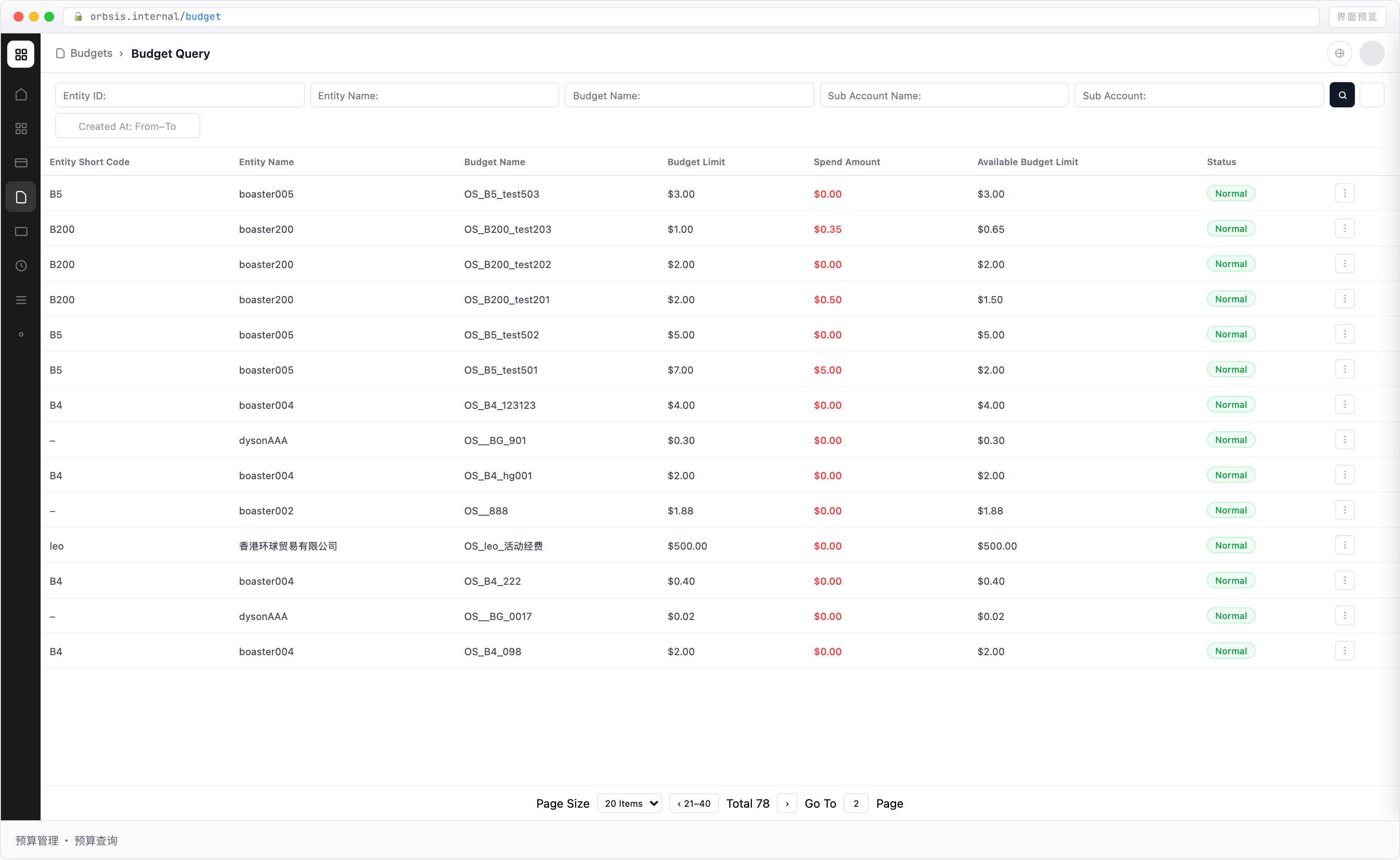
List Fields
| Field | Type | Description |
|---|---|---|
| Entity Short Name / Entity Name | TEXT | Entity that owns the Budget |
| Budget Name | TEXT | Business name of the Budget |
| Budget Limit | AMOUNT | Total limit allocated to the Budget |
| Total Spent | AMOUNT | Transaction amount generated by cards associated with the Budget |
| Available to Spend | AMOUNT | Budget Limit − Total Spent |
| Utilized Limit | AMOUNT | Limit already occupied by spending or card limits and no longer available for allocation |
| Available Limit | AMOUNT | Budget Limit − Utilized Limit |
| Status | ENUM | Current status of the Budget |
Limit Model
Budget Limit
Budget Limit is the total limit allocated to the Budget.
The limit is allocated from the Available Balance of the associated Sub Account.
Total Spent
Total Spent represents the transaction amount generated by all cards associated with the Budget.
It includes:
- Authorizations and spending from shared cards
- Authorizations and spending from limited cards
Available to Spend
Available to Spend represents how much of the Budget limit has not yet been actually spent.
Formula:
Available to Spend = Budget Limit − Total Spent
Utilized Limit
Utilized Limit represents the portion of the Budget limit that has already been occupied and can no longer be freely allocated.
It includes:
- Spending and authorization amounts occupied by shared cards
- Total configured Card Limit of limited cards
Therefore, even if a limited card has not yet generated actual spending, its configured Card Limit still occupies the Budget limit.
Available Limit
Available Limit represents the portion of the Budget that has not yet been occupied by spending or card limits and can still be freely allocated.
Formula:
Available Limit = Budget Limit − Utilized Limit
:::info Available to Spend vs. Available Limit
Available to Spend answers:
How much of the entire Budget has not yet been actually spent?
Available Limit answers:
How much limit remains unspent and unreserved by limited cards, and can still be freely allocated?
These are not the same field.
:::
Relationship with Card Limits
Shared Cards
Shared cards do not have an independent Card Limit. They directly share the Available Limit of the associated Budget.
Therefore:
Shared Card Available to Spend = Available Limit of the associated Budget
Limited Cards
A limited card is assigned an independent Card Limit when the card is created.
Its Card Limit occupies the Budget's Utilized Limit in advance.
Therefore:
Limited Card Available to Spend = Card Limit − Total Spent of the card
Even when the Budget's Available Limit has reached 0, an existing limited card can continue to be used within its own remaining Card Limit as long as the card still has Available to Spend.
Budget Details
Click a Budget record to view its complete details.
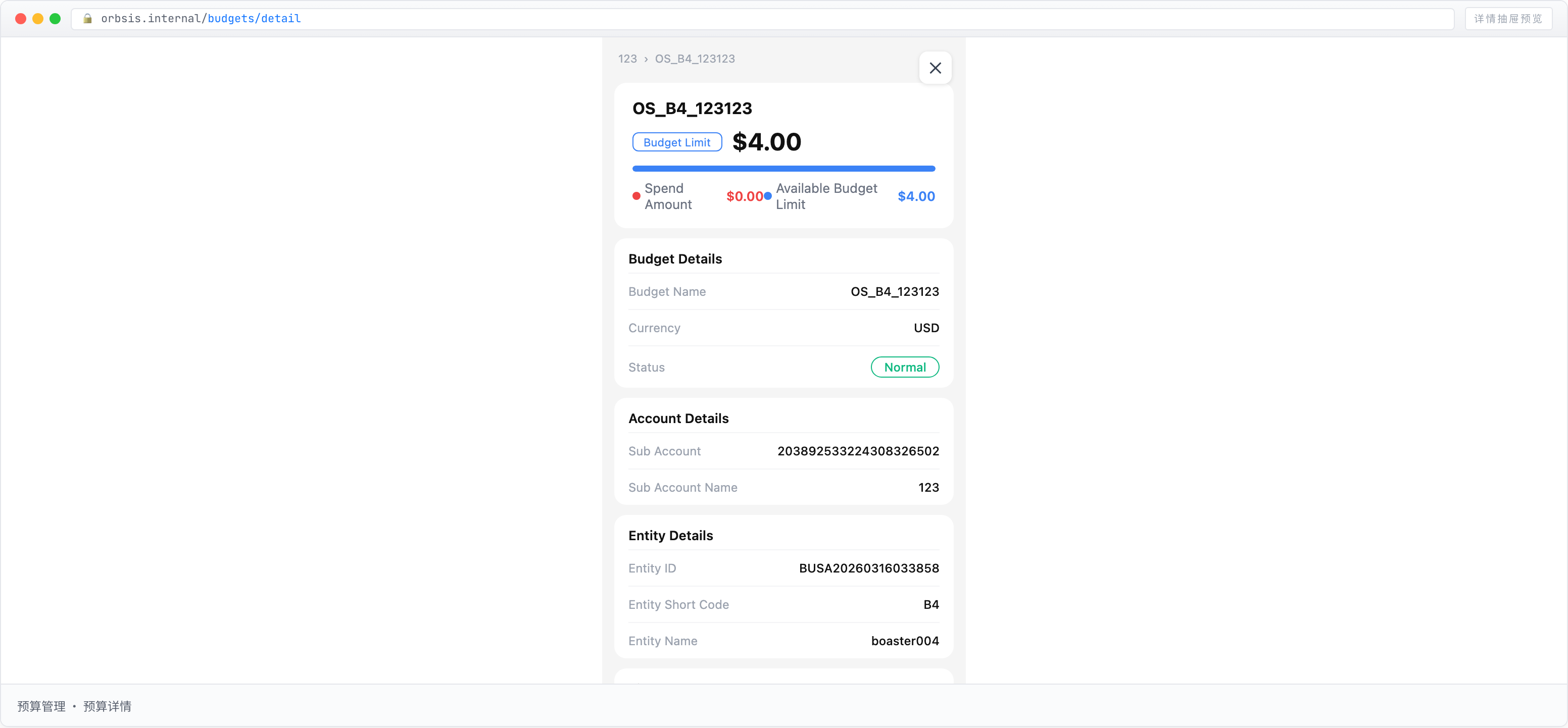
The details mainly include:
- Limit Information
- Budget Information
- Sub Account Information
- Entity Information
- Dates
Budget Information
| Field | Description |
|---|---|
| Budget Name | Identifier of the Budget, defined by the Entity when the Budget is created |
| Currency | Settlement currency of the Budget, currently primarily USD |
| Status | Current status of the Budget |
Sub Account Information
| Field | Description |
|---|---|
| Sub Account No. | Unique code of the Sub Account associated with the Budget |
| Sub Account Name | Display name of the associated Sub Account |
Entity Information
| Field | Description |
|---|---|
| Entity ID | Unique identifier of the Entity that owns the Budget |
| Entity Short Name | Short identifier of the associated Entity |
| Entity Name | Full registered name of the associated Entity |
Dates
| Field | Description |
|---|---|
| Created At | Time when the Budget was created |
| Updated At | Time when the Budget information was last updated |
:::warning Insufficient Limit
When Available to Spend is insufficient, the Budget no longer has enough unspent limit overall.
When Available Limit is 0, no additional limit can be allocated to new limited cards or used by shared cards. Limited cards that already have an assigned Card Limit continue to follow their own Card Limit and remaining Available to Spend.
To increase the Budget Limit, adjust the Budget limit from the Business Portal.
:::