Find VCC Cards
VCC Card Query is used to review virtual cards issued on the platform, including the owning Entity, Budget, card type, limit, spending, and current status.
Entry
Left navigation:
VCC Card Management → VCC Card Query
Filters
| Field | Type | Description |
|---|---|---|
| Entity ID / Entity Name | TEXT | Restricts the query to cards under a specified Entity |
| Budget Name | TEXT | Restricts the query to cards under a specified Budget |
| Card Name | TEXT | User-defined card name |
| Status | ENUM | Filters by card status, such as Active or Disabled |
| Created At | DATE | Time range when the card was created |
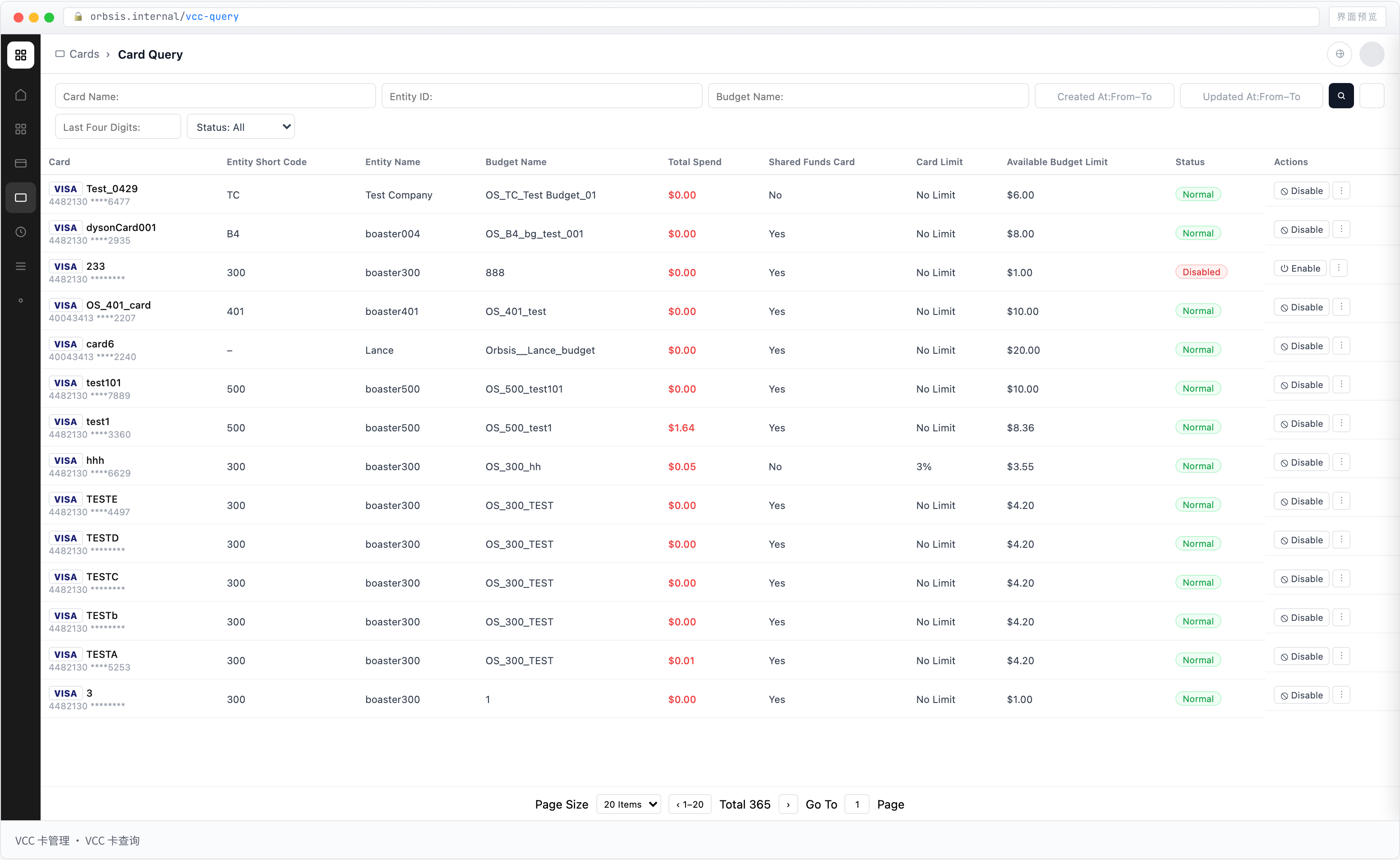
List Fields
| Field | Type | Description |
|---|---|---|
| Card | CARD | Displays the card name, card network, and masked card number |
| Entity Short Name / Entity Name | TEXT | Entity that owns the card |
| Budget Name | TEXT | Budget associated with the card |
| Shared Card | ENUM | Distinguishes shared cards from limited cards |
| Card Limit | AMOUNT | Shared cards display No Limit; limited cards display the configured total spending limit |
| Total Spent | AMOUNT | Transaction amount already generated by the card, including Processing and Successful transactions |
| Available to Spend | AMOUNT | Calculated according to the shared-card or limited-card model |
| Status | ENUM | Current card status, such as Active or Disabled |
| Action | BTN | Provides Enable / Disable and Details actions |
Card Types
Shared Card
A shared card does not have an independent Card Limit and shares the Available Limit of its associated Budget with other shared cards under the same Budget.
Therefore:
Card Limit = No Limit
Available to Spend = Available Limit of the associated Budget
Each authorization or spending transaction on a shared card occupies the associated Budget limit.
Limited Card
A limited card is assigned an independent Card Limit when it is issued.
The configured Card Limit occupies the Utilized Limit of the associated Budget in advance.
Therefore:
Available to Spend = Card Limit − Total Spent
Even if the associated Budget's Available Limit is currently 0, a limited card can continue to be used within its own remaining Card Limit as long as the card still has Available to Spend.
Card Limit
Card Limit represents the total spending limit configured by the user for the card.
- Shared Card: Not applicable; the interface displays
No Limit - Limited Card: Displays the actual spending limit configured for the card
Card Limit is not a usage percentage. The interface should display the actual limit amount.
Total Spent
Total Spent represents the transaction amount already generated by the card.
The calculation includes:
- Processing transactions
- Successful transactions
Available to Spend
Available to Spend answers:
How much can this card still spend right now?
The calculation depends on card type:
| Card Type | Calculation |
|---|---|
| Shared Card | Available Limit of the associated Budget |
| Limited Card | Card Limit − Total Spent |
The card list no longer displays a separate Budget Available Limit field.
To review the complete Budget limit status, go to Budget Query and review Budget Limit, Utilized Limit, and Available Limit.